Can Python be 876 times faster?
 Marcin Polkowski
Translated from Polish. Originally published on morony.pl on 26 Oct 2016.
I started using Python about 5 years ago. At first I wasn't convinced, but I had no choice. Over time it won me over, and I've done a number of projects with it, both small and large. I also taught introductory programming in Python for 4 years – to this day I'm not convinced it's a good first language (it forgives a bit too much), but that wasn't my decision.
Back to the topic: Python has one serious drawback – it's terribly slow. Today I want to show you, with an example, how easy it is to use functions written in C/C++ to do the calculations in a program written in Python. Python is brilliant at reading, writing and visualizing data, while C/C++ is very efficient. The combination seems ideal, and it turns out to be quite simple.
Let's take a simple task as an example: we generate a list of N random numbers between 0 and 1. We want to compute every possible sum of 3 numbers from this list without repetition, and count how many of them equal 1 to within a given precision. Of course this problem could be optimized, but that's not today's topic. We want to compare the performance of pure Python and Python backed by C++.
First, let's write a function in C++ (file CALC.cpp):
#include "CALC.h"
#include <cstdio>
#include <cstdlib>
#include <cmath>

void _CALC(double *DATA, int *RESULT, int N,  double treshold)
{
    printf("C++ start\n");

    RESULT[0] = 0;
    for (int a = 0; a < N; a++)
    {
        for (int b = a+1; b < N; b++)
        {
            for (int c = b+1; c < N; c++)
            {
                if (fabs(DATA[a] + DATA[b] + DATA[c] - 1) < treshold)
                {
                    RESULT[0]++;
                }
            }
        }
    }

    printf("C++ finish\n");
}
It comes with a header file (CALC.h):
void _CALC(double *DATA, int *RESULT, int N, double treshold);
The function above does exactly what we set out to do – it counts how many combinations without repetition sum to 1 to within "treshold". What the function's arguments are should become clear in a moment.
Our goal is to be able to call this function from Python like this (program.py):
import numpy
import CALC
import time
start_time = time.time()

N = 1000
treshold = 1e-7

DATA = numpy.random.uniform(0, 1, size=N)
RESULT = numpy.zeros((1,), dtype=numpy.int)

start_time = time.time()
CALC.CALC(DATA, RESULT, N, treshold)
t1 = (time.time() - start_time)
print("C++:", RESULT[0], t1)

start_time = time.time()
count = 0;
for a in range(0,N):
    for b in range(a+1,N):
        for c in range(b+1,N):
            if abs(DATA[a]+DATA[b]+DATA[c]-1) < treshold:
                count =count + 1
t2 = (time.time() - start_time)
print("Python:", count, t2)

print("Speed:", t2/t1)
Specifically, I mean this line:
CALC.CALC(DATA, RESULT, N, treshold)
We need a binding (interface) between Python and C++ (CALCmodule.cpp). It's a piece of code that turns our C++ function into a Python module. I didn't write it myself; I put it together from several tutorials. The most important part is the CALC function, where we define our variables and call the function that does the calculation:
#include <Python.h>
#define NPY_NO_DEPRECATED_API NPY_1_10_API_VERSION
#include <numpy/arrayobject.h>
#include "CALC.h"

struct module_state {
    PyObject *error;
};

#define GETSTATE(m) ((struct module_state*)PyModule_GetState(m))

static PyObject* CALC(PyObject* self, PyObject* args)
{
    PyArrayObject *data_obj;
    PyArrayObject *result_obj;
    double treshold;
    int N;

    if (!PyArg_ParseTuple(args, "OOid", &data_obj, &result_obj, &N, &treshold))
    {
        Py_INCREF(Py_None);
        return Py_None;
    }

    double *DATA = static_cast<double *>(PyArray_DATA(data_obj));
    int *RESULT = static_cast<int *>(PyArray_DATA(result_obj));

    _CALC(DATA, RESULT, N, treshold);

    Py_INCREF(Py_None);
    return Py_None;
}

static PyMethodDef CALCMethods[] = {
    {"CALC", CALC, METH_VARARGS, "..."},
    {NULL, NULL, 0, NULL}
};

static int CALC_traverse(PyObject *m, visitproc visit, void *arg) {
    Py_VISIT(GETSTATE(m)->error);
    return 0;
}

static int CALC_clear(PyObject *m) {
    Py_CLEAR(GETSTATE(m)->error);
    return 0;
}

static struct PyModuleDef moduledef = {
        PyModuleDef_HEAD_INIT,
        "CALC",
        NULL,
        sizeof(struct module_state),
        CALCMethods,
        NULL,
        CALC_traverse,
        CALC_clear,
        NULL
};

extern "C" PyObject * PyInit_CALC(void)
{
    PyObject *module = PyModule_Create(&moduledef);
    if (module == NULL)
        return NULL;
    struct module_state *st = GETSTATE(module);

    st->error = PyErr_NewException("CALC.Error", NULL, NULL);
    if (st->error == NULL)
    {
        Py_DECREF(module);
        return NULL;
    }
    import_array();
    Py_INCREF(module);
    return module;

}
The page https://docs.python.org/2/c-api/arg.html describes in detail the data types we can pass from Python to C++ and back. In the example above, "OOid" means two objects, an integer and a floating-point number (double). An object can be a list that we can read from and write to. The name of our module appears many times in this code – if you change it, remember to change it everywhere.
The last step is compiling the module. We need a build script (setup.py):
from distutils.core import setup, Extension
import numpy.distutils.misc_util
import os

os.environ["CC"] = "g++"
os.environ["CXX"] = "g++"

module1 = Extension('CALC', sources = ['CALCmodule.cpp', 'CALC.cpp'])

setup (name = 'CALC',
       version = '1.0',
       description = 'Package for calculating number sums',
       ext_modules = [module1],
       include_dirs=numpy.distutils.misc_util.get_numpy_include_dirs())
Now we can compile and run: 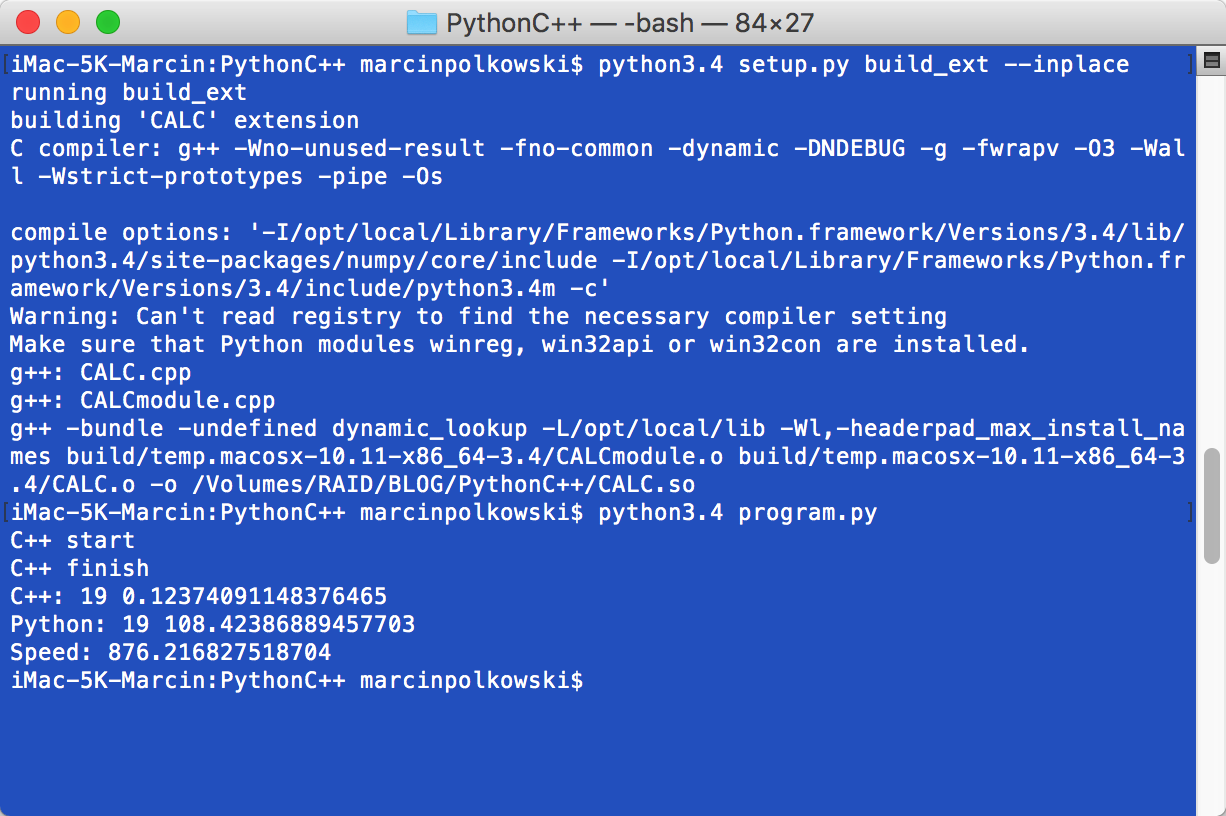
The C++ function needed 0.12 seconds to work out that there are 19 triples that sum to 1 to within 0.0000001. Python needed 108.42 seconds for the same calculation: 876 times longer! Of course this code could be optimized, but we're comparing two identical solutions. The difference in time is huge. My work often involves numerical computation, so I first build a prototype in Python and then rewrite the computational part in C++.
I don't want to go into the theory of building Python modules, because it's not something I know much about. I learn best from examples myself, so I hope this one will be useful to you.
Let me know whether you've ever used solutions like this, or whether they'll come in handy for you in the future.